How Do I Get Satellite Radio in My Car: Easy Steps
Imagine cruising down the highway, your favorite tunes or riveting talk shows streaming seamlessly without a single interruption. Satellite radio can make this dream a reality.
Whether you’re tired of static-filled FM channels or just want access to a broader range of content, satellite radio is your gateway to a limitless audio experience. You might be wondering how to bring this premium listening experience right into your car.
Don’t worry—it’s easier than you think. In this guide, we’ll unlock the secrets to transforming your car into a rolling entertainment hub. Stick with us, and you’ll soon discover how straightforward it is to get satellite radio in your car, ensuring every drive is as enjoyable as your favorite playlist.
Choosing A Satellite Radio Service
Satellite radio transforms your car into a music hub. But choosing a service is crucial. A few providers dominate the market. Different plans cater to various needs. Understanding options helps make the best choice.
Popular Service Providers
SiriusXM is a leading name. It offers diverse channels and content. From music to sports, there’s something for everyone. WorldSpace was popular in some regions. But it ceased operations. Other smaller providers exist, but SiriusXM remains prominent.
Comparing Subscription Plans
Plans vary in price and content access. Basic plans offer limited channels. More expensive plans provide premium content. Some plans include app access. This allows listening beyond the car. Consider channel preferences when choosing a plan. Family plans offer multiple logins. They can save money for households. Always check promotional offers. They might provide added value.

Credit: www.youtube.com
Assessing Your Car’s Compatibility
Satellite radio offers a variety of music, news, and entertainment. Before you enjoy this in your car, check its compatibility. This is crucial to ensure a smooth setup. Some cars already have satellite radio built-in. Others might need aftermarket solutions. Let’s explore your car’s options.
Built-in Satellite Radio Options
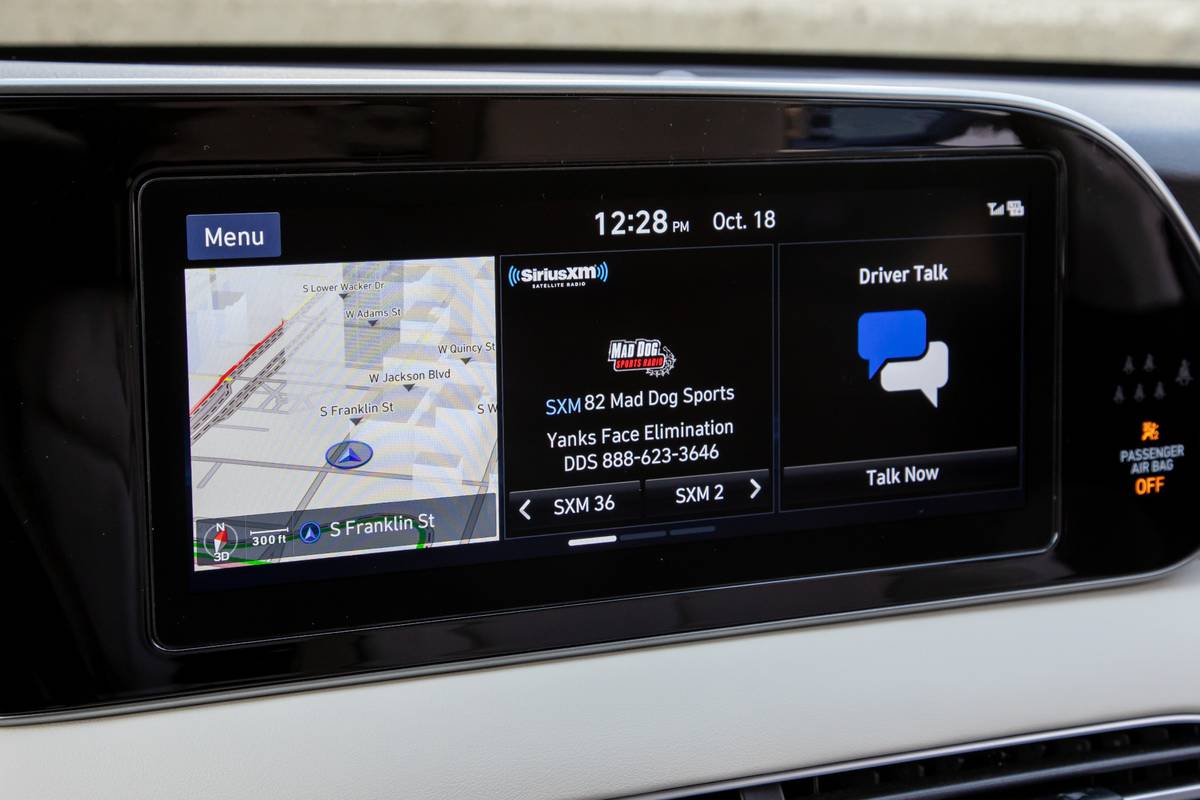
Many newer cars come with built-in satellite radio. Check your car’s manual to see if it’s equipped. Look for a “SAT” button on your radio console. This is a sign of built-in capability. Some cars require activation of the satellite service. This usually involves contacting a satellite radio provider.
Aftermarket Solutions
If your car doesn’t have built-in satellite radio, don’t worry. There are aftermarket solutions available. You can install a satellite radio receiver yourself. This often involves a simple plug-and-play setup. Another option is a professionally installed system. Many car audio shops offer this service. They can install and integrate the radio seamlessly.
Consider portable satellite radios. These can be used in any car. They easily attach to your dashboard or console. Portable radios offer flexibility and convenience. They often come with easy-to-use interfaces. This makes them a popular choice for many drivers.
Installing A Satellite Radio Receiver
Getting satellite radio in your car requires installing a satellite radio receiver. Start by selecting a compatible receiver and following the manufacturer’s installation instructions. Enjoy diverse music, news, and entertainment channels with enhanced audio quality.
Installing a satellite radio receiver in your car can open up a world of entertainment. From music to talk shows, the variety is endless. But how do you get started with the installation? Whether you opt for professional help or decide to do it yourself, understanding the process is key. Let’s dive into the options that you have, each with its own benefits and steps.Professional Installation
Opting for professional installation can save you time and hassle. Experts have the tools and knowledge to get the job done efficiently. You’ll find that many car audio specialists offer satellite radio installation services. By choosing this route, you are ensuring that everything is set up correctly, from wiring to mounting. Professional installers often provide warranties on their work. This means if something goes wrong, you have peace of mind knowing that support is just a phone call away.Diy Installation Guide
Feeling adventurous? Installing a satellite radio receiver yourself can be a rewarding experience. It’s a chance to learn about your car’s inner workings while saving money. Start by purchasing a satellite radio kit from a trusted retailer. These kits usually come with everything you need: receiver, antenna, and wiring. Follow the instructions carefully. It may involve removing parts of your dashboard to connect the wiring. Taking pictures along the way can help you remember where everything goes. Ensure the antenna is mounted in a spot with a clear view of the sky. This ensures optimal signal reception. Remember, patience is your ally in this process. Whether you choose professional help or DIY, the joy of having satellite radio in your car is worth the effort. What choice will you make?Connecting To Your Car’s Audio System
Connecting satellite radio to your car’s audio system can enhance your driving experience. There are several ways to link the radio to your car’s speakers. These methods include using an auxiliary cable, Bluetooth, or an FM transmitter. Each method has unique advantages, so choose the best fit for your needs.
Using An Auxiliary Cable
An auxiliary cable is a simple way to connect satellite radio. Plug one end into the radio and the other into your car’s audio jack. This direct connection offers clear sound quality. Ensure the cable is compatible with your devices. This option is great for cars with built-in audio jacks.
Bluetooth Connectivity
Bluetooth provides a wireless solution for connecting satellite radio. Pair the radio with your car’s Bluetooth system. Follow the pairing instructions on both devices. This method eliminates the need for cables. It allows for easy switching between devices. Ensure your car’s system supports Bluetooth.
Fm Transmitter Method
An FM transmitter can connect satellite radio without cables. Set the transmitter to a clear FM frequency. Tune your car’s radio to the same station. This method is useful for older car models. It might not offer the best sound quality. Ensure the transmitter is properly set up for optimal performance.
Activating Your Satellite Radio
Discovering satellite radio for your car involves installing a compatible receiver or using a radio service app. Tune into diverse channels and enjoy uninterrupted entertainment while driving. Subscription may be required for access to premium content.
Activating your satellite radio can be an exciting journey into a world of endless entertainment possibilities. With a few simple steps, you can unlock a plethora of channels ranging from music to news, sports, and talk shows. Whether you’re doing it online or over the phone, the process is straightforward and convenient.Online Activation Process
Activating your satellite radio online is quick and can be done right from your smartphone or computer. Start by visiting the radio service provider’s website. You’ll need the radio ID, which you can find on your device’s display or in the manual. Once you’re on the site, look for the activation section. Follow the prompts, entering your radio ID and any other required details. If you’re like me, you might enjoy the ease of doing this while having a coffee break. Within minutes, your favorite channels will be ready to stream, offering a seamless listening experience.Phone Activation Steps
Prefer to speak with someone? Phone activation is another efficient method. Keep your radio ID and payment details handy before you call the service’s customer support number. During the call, you’ll be guided by a representative who will assist you through the activation process. If you’ve ever been stuck in a tech bind, you know how reassuring it is to have a human voice walk you through the steps. By the end of the conversation, your radio will be buzzing with exciting content. Have you considered which channel you’ll tune into first? Whether it’s the latest hits or a classic rock channel, the choice is yours. Activating your satellite radio doesn’t have to be a chore. With clear steps and a bit of anticipation, you’re set to enjoy an enriched driving experience.Exploring Satellite Radio Features
Satellite radio offers a unique audio experience for car owners. It brings a wide range of features that enhance listening pleasure. These features make satellite radio a popular choice for many drivers.
Channel Selection
Satellite radio provides an extensive selection of channels. These channels cover various genres and interests. Music lovers can enjoy rock, jazz, or country stations. News enthusiasts have access to global news channels. Comedy and sports channels are also available. This variety ensures there’s something for everyone.
Customizing Stations
Satellite radio allows users to customize their listening experience. You can create personalized stations based on preferences. Skip songs you don’t like. Mark your favorite tracks. This feature ensures you hear more of what you love. It helps tailor the listening experience to your taste.
Using Mobile Apps
Many satellite radio services offer mobile apps. These apps enhance your listening experience on the go. Access your favorite stations from your smartphone. Stream music and shows even outside your car. The apps often include additional features. This includes on-demand content and easy navigation.
Troubleshooting Common Issues
Getting satellite radio in your car involves a few simple steps. First, check if your car stereo is compatible with satellite radio. If not, consider purchasing a satellite radio receiver. Then, subscribe to a service like SiriusXM to enjoy a variety of channels and music while driving.
Troubleshooting common issues with satellite radio in your car can be a bit daunting, but understanding the root causes makes the process smoother. Whether it’s signal interference, audio quality problems, or subscription and billing questions, having a few troubleshooting tips up your sleeve can save you time and frustration. Let’s dive into some specific issues you might encounter and how to address them effectively.Signal Interference
Signal interference can be frustrating, especially when you’re in the middle of your favorite song. If your satellite radio cuts out frequently, check for potential obstructions. Tall buildings, dense trees, or even a bridge can block the signal. Ensure your antenna is installed correctly. A simple adjustment might make a difference. Regularly cleaning your antenna can also help maintain a strong connection. Consider your driving speed. Sometimes, slowing down can improve reception in areas prone to interference.Audio Quality Problems
Poor audio quality can dampen your listening experience. If the sound is distorted or unclear, start by checking the audio settings. Make sure your car’s equalizer settings are balanced for the best sound output. Look at the hardware. Worn-out cables or connectors can affect audio quality. Replacing these might solve the issue. Experiment with different channels. Audio quality can vary from one channel to another. Finding a channel with better sound can be a simple fix.Subscription And Billing Questions
Subscription and billing questions can be perplexing. If you’re unsure about your subscription status, log into your account online to verify your current plan and renewal date. Keep an eye on unexpected charges. Sometimes, promotional periods end, leading to higher bills. Understanding your billing cycle can prevent surprises. Don’t hesitate to contact customer support. They can clarify any discrepancies and guide you through resolving account issues. Have you ever been surprised by a bill? Double-checking your subscription details might prevent future surprises. Navigating these common issues doesn’t have to be overwhelming. What challenges have you faced with your satellite radio? Addressing them directly can enhance your overall listening experience.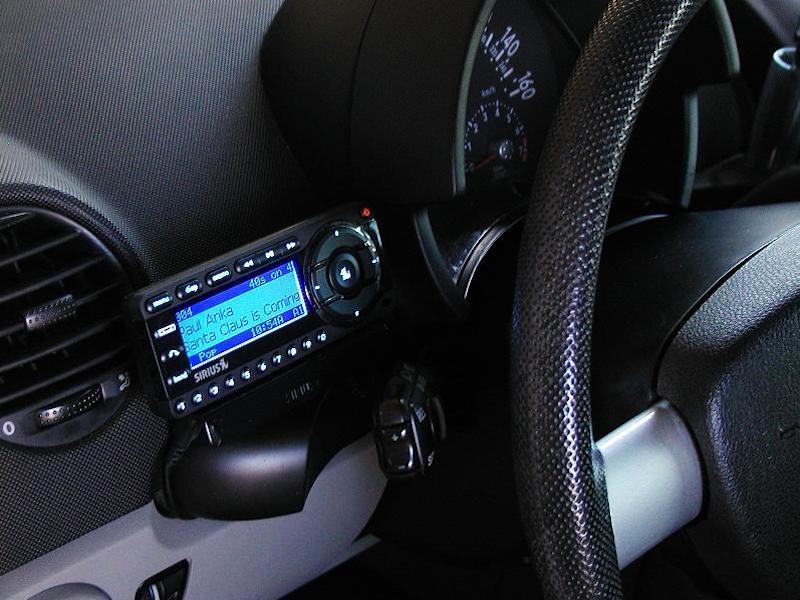
Credit: vaistech.com
Credit: www.sony.ca
Frequently Asked Questions
Can Satellite Radio Be Added To A Car?
Yes, you can add satellite radio to a car. Purchase a compatible receiver or tuner. Install it professionally or DIY. Connect it to your car’s audio system. Subscribe to a satellite radio service. Enjoy a wide variety of channels and high-quality sound.
Always ensure compatibility with your car model.
How Do I Get Siriusxm On My Car Radio?
Activate SiriusXM by tuning your car radio to channel 0. Note the Radio ID displayed. Visit the SiriusXM website or call their customer service to subscribe. Follow activation instructions provided by SiriusXM. Ensure your car radio is compatible with SiriusXM.
Enjoy a wide range of channels post-activation.
How Do You Get Siriusxm In A Car That Doesn’t Have It?
Install a SiriusXM satellite radio adapter or tuner. Use a portable SiriusXM radio with a car kit. Connect via Bluetooth or AUX cable. Subscribe to SiriusXM service for access.
How Much Does It Cost To Get Sirius Radio In Your Car?
SiriusXM radio costs depend on the subscription plan you choose, ranging from $5 to $21 per month. Activation fees might apply. Special offers can reduce costs. Check SiriusXM’s website for the latest pricing and promotions. Additional equipment may be required for older vehicles without satellite radio.
Conclusion
Getting satellite radio in your car is simple and rewarding. First, choose the right equipment for your vehicle. Consider factors like your budget and compatibility. Install your chosen device following the instructions. Test the setup to ensure it works well.
Enjoy diverse channels and clear sound quality. Listening to satellite radio makes your drives more fun. It’s an excellent way to discover new music and information. Remember, a good setup enhances your experience. Explore options that fit your needs. Happy listening!

Ethan Montgomery is the administrator of carweldhub.com and an expert in the automotive industry. With hands-on experience in welding and a deep understanding of automotive parts and accessories, Ethan brings a wealth of practical knowledge to his work. His passion for the automotive field extends to blog writing and editing, where he shares valuable insights and tips with enthusiasts and professionals alike. Whether you’re looking for detailed technical advice or the latest trends in automotive technology, Ethan’s expertise makes him a trusted resource in the automotive community.